A Bancoli-to-Bancoli on-chain payment can settle what two businesses agreed when both Smart USD Wallets support the same stablecoin and a compatible network.
A billing record still does not authorize a payment on its own, and a submitted payment is not a closed invoice. Keep the invoice, the approval, and the receipt evidence as separate records. This guide is only about payments between two Bancoli users. For matching stablecoin receipts to invoices in general, including payments that do not stay between two Bancoli users, use Match stablecoin receipts to invoices.
Summary
- Use a Bancoli-to-Bancoli on-chain payment when both businesses support the same stablecoin and a compatible network.
- Automate invoice matching only in an accounting system that can apply your rules. Do not assume an invoice authorizes a wallet payment, and do not assume a payment closes the invoice by itself.
- The wallet is self-custodial. You control your funds. Bancoli does not own or control them. Keep named USD details and wallet assets distinct.
- Close invoices against verified payment evidence, not against a submitted payment request.
Why this matters
Bancoli-to-Bancoli on-chain payments fit a 2027 workflow when both counterparties already use supported stablecoins and can receive the same asset on a compatible network. The practical advantage is a consistent payment and recordkeeping path, not permission to skip approvals or verification.
An invoice establishes what a customer owes. A wallet transaction records an asset movement. Your accounting process must connect those records before it treats the invoice as paid.
Separate the two automation decisions below. Automate matching before you automate payment authorization.
| Workflow | Useful when | What it does | Main limitation |
|---|---|---|---|
| Invoice reconciliation | Finance teams matching incoming payments | Connects verified receipts to invoice balances | Needs reliable transaction evidence and matching rules |
| Payment execution | Teams with documented authorization | Initiates an approved outgoing payment | Needs separate permissions and supported capabilities |
Where Bancoli fits
Bancoli is a stablecoin on-ramp and off-ramp for businesses. It is not an account that holds many local currencies. Your Smart USD Wallet holds supported stablecoins, and you convert when you pay out.
The Smart USD Wallet can accept and hold USDC, USDi and USDT (USDT on Ethereum only, when your account shows it). The wallet is self-custodial. You control your funds. Bancoli does not own or control them. Banking services are provided through an affiliated chartered bank. USDC is supported on Ethereum and Base only. USDi is supported on Base only. USDT is supported on Ethereum only and is never bought.
Named USD payment details in your business’s legal name are available on every plan, including Free, once your business is verified. With Bancoli, you can send and receive USD by ACH, RTP and wire. Incoming wires are US domestic wires. Bancoli also receives stablecoins and sends local payouts. ACH and RTP can arrive as USDT on Ethereum when you choose that asset. You can also buy USDC with USD by sending it by ACH or RTP from your own business bank account to your named USD details and choosing USDC. Receiving an ACH or RTP payment costs $2 on Free, $1 on Plus, and it is free on Premium. No Bancoli limit on ACH or RTP.
To pay a supplier, you choose a supported currency and route for their location and pay from your Smart USD Wallet. Your supplier receives local currency in their own bank account. They do not need to be on Bancoli for a supported bank payout. You get free FX in 25+ currencies on local payouts, including Chilean pesos (CLP), and the pricing page lists the currencies. You can see the steps on Bancoli global payouts.
Businesses from 150+ countries are eligible. Access still depends on your business, your location and verification. Review eligibility before you apply.
A Bancoli-to-Bancoli on-chain payment is available when both users support the same stablecoin and a compatible network. It is not a pay-by-handle product, and it does not close invoices by itself.
See the Smart USD Wallet: https://bancoli.com/solutions/smart-usd-account
| Dimension | Bancoli |
|---|---|
| How customers pay | Named USD details by ACH, RTP and US domestic wire, plus supported stablecoins, including Bancoli-to-Bancoli on-chain payments |
| Sending USD | ACH, RTP and wire |
| Custody | Self-custodial. You control your funds |
| ACH and RTP | No Bancoli limit on ACH or RTP |
| Supplier payouts | Local currency, with free FX in 25+ currencies on local payouts |
Before you start
- Both businesses need eligible, verified Smart USD Wallets and access to the relevant payment functions. Confirm eligibility, verification, and the actual stablecoin and network choices shown to each counterparty.
- Prepare the invoice identifier, outstanding balance, settlement asset, recipient details, authorized approver, and accounting destination. Use documented export or integration capabilities in the system you already use. Do not assume a particular connector, API event, or automatic invoice-closing feature exists.
- A matching token name is not enough. Both sides must use a compatible supported network and the correct recipient details. USDC must be on Ethereum or Base, USDT on Ethereum, and USDi on Base. A transaction identifier alone does not prove that the intended recipient received the agreed asset.
Keep your 2027 setup record alongside the approval policy so a replacement operator can understand the rules without reconstructing them from messages.
Invoice record configuration
The labels below are suggested fields for your accounting worksheet or integration mapping, not dashboard button names. Create them in the system you already use to manage invoices.
- Assign an invoice reference. Store Invoice ID as a unique identifier. Keep it unchanged across the invoice, payment instruction, approval record, and reconciliation entry.
- Define the obligation. Record invoice currency, outstanding amount, and settlement asset separately. A USD-denominated invoice and a stablecoin receipt are related records, not interchangeable descriptions.
- Specify the destination. Record the recipient, network, and verified destination details. Confirm those details through your supplier-verification process before approving payment.
- Write the settlement rule. State whether the creditor accepts the chosen stablecoin as payment and how the parties handle any conversion, deductions, or difference between the invoice amount and the amount received.
- Assign ownership. Record the approver and the exception owner. The person responsible for investigating a mismatch must be identifiable before the first payment.
Use one unique invoice ID per invoice. If a customer pays several invoices together, retain the separate invoice IDs and create an explicit allocation rather than replacing them with a single payment reference.
Expected result: a reviewer can determine what is owed, which asset settles it, where payment belongs, and who resolves discrepancies without consulting an informal chat history.
Payment authorization configuration
Treat an invoice as a request for payment, not as authority to move wallet assets. Approval must cover the actual recipient, asset, network, and amount.
- Confirm compatibility. Have both counterparties verify that their Smart USD Wallets support the intended stablecoin and network. Use the supported-network selection guide to structure that check, and confirm the current choices inside each wallet before sending.
- Verify the instruction. Compare the payment destination with the approved supplier record. Independently confirm changes to recipient details rather than accepting an edited invoice as sufficient evidence.
- Approve the payment separately. Apply your existing authorization process. Enable unattended execution only when documented capabilities and your business permissions explicitly support it.
- Record the submission. Save the payment reference and any transaction identifier supplied by the payment flow. Label the record as submitted until receipt has been verified.
- Check before retrying. If the interface or integration returns an uncertain result, investigate the original attempt before submitting another payment.
Expected result: the payment has an auditable authorization trail, and a submission record cannot be mistaken for a completed receipt.
For your 2027 operating procedure, document who can change recipient instructions and who can approve the resulting payment. Do not let an automation grant those permissions on its own.
Receipt-matching configuration
Build the matching process around evidence of receipt. Configure these rules only in an accounting or integration system whose documented capabilities support them. Otherwise apply the same checklist manually.
- Collect the receipt. Capture the transaction identifier, asset, network, destination, received amount, and available status evidence. Preserve the source record rather than keeping only a copied balance.
- Validate the destination. Confirm that the payment reached the intended recipient through the agreed network. A transaction with the right amount but the wrong destination is not a match.
- Match the obligation. Connect the receipt to Invoice ID using the payment reference or another agreed, reliable association. Do not match by amount alone when more than one invoice could fit.
- Compare the amounts. Apply the written settlement rule. Route underpayments, overpayments, deductions, and unclear allocations to the exception owner rather than silently changing the invoice balance.
- Prevent duplicate processing. Before applying a receipt, check whether the same network and transaction identifier have already been recorded. Where one transaction covers several invoices, preserve the allocation without counting the receipt twice.
Expected result: every matched receipt identifies the creditor, obligation, asset, network, and amount, while ambiguous payments remain outside automatic closure.
The sequence is simple: invoice record, payment approval, receipt evidence, and invoice closure. Each stage depends on evidence from the previous stage, not just the appearance of activity in a dashboard.
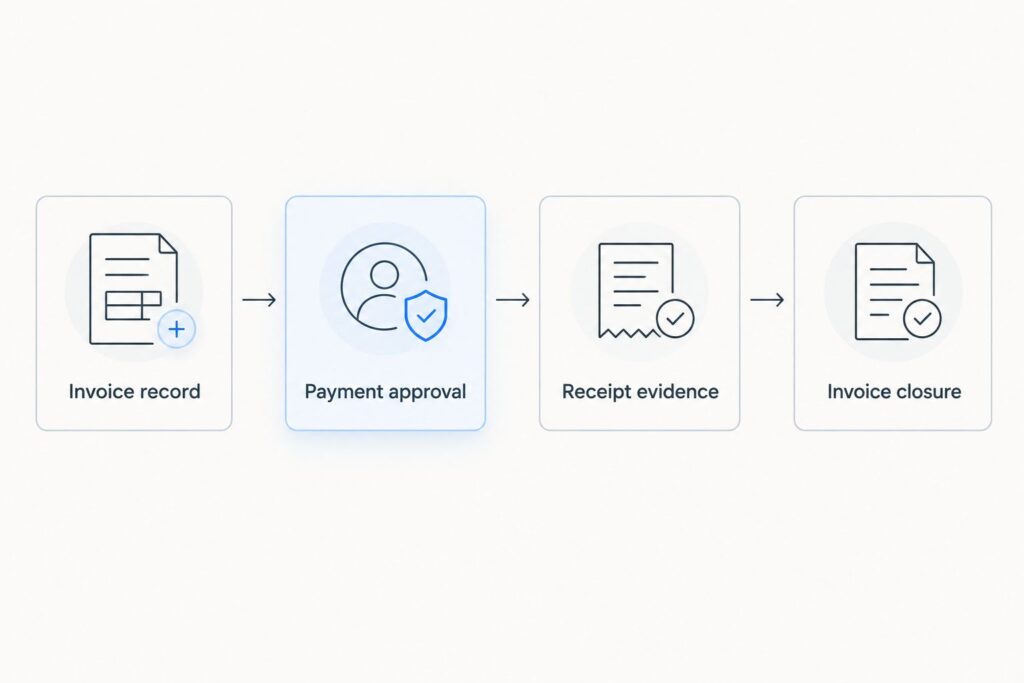
Payment approval and invoice closure require different evidence.
Invoice closure configuration
Close the invoice only after the receipt satisfies your settlement rule. Keep the accounting update separate from the wallet payment so a bookkeeping retry cannot initiate another transfer.
- Define the closure condition. Require a verified receipt, a valid invoice association, and an accepted amount before reducing the outstanding balance.
- Preserve exceptions. Leave a remaining balance for a partial payment. Record an overpayment separately according to your accounting policy rather than forcing the invoice total to match the transfer.
- Store the audit link. Keep at least two linked records: the invoice entry and the transaction evidence. Retain approval evidence with them so the accounting result can be traced back to authorization.
- Separate notifications from the record. Treat an email or integration notification as a prompt to check the payment record, not as a replacement for receipt evidence.
- Test the rules. Before unattended matching, test a full payment, a partial payment, and a repeated transaction event. Confirm that each produces the intended accounting outcome without initiating another payment.
Expected result: an invoice closes once, partial payments retain their outstanding balances, and repeated events do not create duplicate credits.
Include those three test cases in your 2027 acceptance checklist. A successful full-payment test alone does not establish that duplicate handling or partial-payment accounting works.
Match an invoice after a later local-currency payout
A second workflow applies when the recipient later converts or pays out stablecoin proceeds into a local-currency bank account. That later movement needs its own reconciliation trail. It is not another customer payment.
This path is for businesses that receive stablecoins and later pay operating expenses in local currency. The trade-off is an additional conversion and payout record to reconcile.
Record the stablecoin receipt against the invoice first. Then connect any subsequent conversion and bank payout to that receipt or to a documented pool of funds. Do not require a later bank credit to equal the original invoice amount when conversion or applicable charges change the final amount.
For a USDC receipt, reconciling the customer payment and reconciling a later payout answer different questions: whether the customer paid, and where the proceeds subsequently moved. If that later payout is a local-currency payment, use free FX in 25+ currencies on local payouts, including CLP.
Keep the original asset amount, conversion record, payout reference, and bank credit evidence connected. Where funds from several invoices are combined, preserve the allocation instead of inventing a one-to-one relationship.
Expected result: customer settlement remains traceable even when the recipient later moves proceeds through a different currency or payment rail. Confirm corridor eligibility and applicable charges before authorizing that separate movement.
Troubleshooting
The payment is visible, but the invoice remains open
Check the invoice association, destination, asset, network, and accepted amount. A visible transaction does not establish that every closure condition passed.
Fix the mismatched record or obtain the missing evidence. Do not loosen the matching rule merely to clear the exception queue.
The same receipt appears twice
Check whether a notification retry, repeated import, or manual entry created a second accounting record. Compare the network and transaction identifier before applying another credit.
Retain the original receipt and correct the duplicate accounting entry under your bookkeeping procedure. Reprocessing a record must not trigger another outgoing payment.
The recipient received less than the invoice balance
Compare the accepted settlement terms with the actual receipt and any documented deductions. Distinguish an agreed adjustment from an unexplained shortfall.
Leave the invoice partially open unless the creditor has approved a documented adjustment. Do not describe an unresolved difference as fully paid.
The submission result is unclear
Inspect the original payment record and available transaction evidence before retrying. Ask the recipient to check the intended destination where appropriate.
Escalate an unresolved status through the applicable support process. A timeout or missing notification is not proof that no payment occurred.
Customize your workflow
Once receipt matching works, expand the accounting rules rather than immediately adding unattended payment execution. Useful next steps include explicit allocations for combined payments, approval evidence attached to invoice records, and a named owner for unmatched receipts.
For Bancoli invoice workflows in 2027, keep three boundaries visible: authorization permits a payment, receipt evidence supports settlement, and reconciliation updates the books. None substitutes for the others.
If your team changes its accounting system or payment process, rerun the full-payment, partial-payment, and duplicate-event tests before restoring any automation. Preserve the original references during migration so old receipts remain traceable.
Open the Smart USD Wallet at https://bancoli.com/solutions/smart-usd-account
FAQ
Can Bancoli-to-Bancoli on-chain payments automatically close invoices?
No. Automatic invoice closure requires a supported way to obtain payment evidence and apply matching rules in your accounting workflow. Do not assume that an on-chain payment automatically updates an invoice, and do not assume that an invoice authorizes an outgoing transfer.
Do both businesses need the same stablecoin and network?
Yes. Both counterparties must support the intended stablecoin and a compatible network for the payment route. Confirm the actual asset, network, and recipient details before authorization. USDC is on Ethereum and Base only, USDT is on Ethereum only, and USDi is on Base only. A matching token name alone is not enough.
Is a submitted payment the same as a paid invoice?
No. A submitted payment records an attempt, while a paid invoice requires receipt evidence that satisfies the agreed settlement terms.
Can I close an invoice using only the payment amount?
Do not use amount alone when several invoices could match. Connect the receipt to the invoice reference and verify the asset, network, destination, and accepted amount.
What should happen when a customer makes a partial payment?
Apply the accepted receipt to the invoice and preserve the remaining balance. Route unclear deductions or allocation differences to the person responsible for exceptions.
Does a later payout to a bank account settle the invoice again?
No. A later conversion or bank payout moves proceeds that have already been received. Reconcile that movement separately from the original customer payment.
One last thing
A repeated event should repeat the check, not the payment. Make that your final acceptance test: process the same receipt again and confirm that neither the invoice credit nor the outgoing transfer is duplicated.