A marketing agency payment can do more than one job. One client payment can include your earned retainer, money set aside for ad spend and money you owe a production partner. When some clients pay in stablecoins, your process has to keep those parts apart even when everything lands in the same wallet.
This guide shows how to set up client receipts, contractor payments and local currency payouts for an agency, and where Bancoli fits.
In short
- Agree on invoice terms, the stablecoin and the supported network before a client pays.
- Keep retainers, client ad budgets and money owed to partners apart in your books, even when they share a wallet.
- Bancoli fits agencies that want named USD details, a self-custodial Smart USD Wallet and local payouts to contractors and suppliers.
- Compare what your contractor actually receives, not only the conversion fee.
Why this matters for agencies
Choose the payment route around the bill you need to pay next. A stablecoin receipt does not finish the job if your media bill or contractor invoice has to be paid in local currency.
Before you accept a payment, agree on the currency of the invoice, how any conversion is worked out and what proof closes the invoice. The guide on agreeing invoice amounts and exchange rates covers what to put in your client terms.
A transaction you can see on a blockchain, a receipt your provider confirms and a supplier payout that has landed are three different events. Give your account managers clear words for each one, so nobody marks an invoice paid too early.
Set up your agency payment workflow
Map each receipt to the bill it pays
Start with a spreadsheet and the invoices you already have. List which clients pay in stablecoins, which costs need bank payments and which balances you must keep for future client work. You do not need a new platform to do this.
Keep money apart by purpose in your books. A retainer, a cost the client will reimburse and a campaign budget should not become one balance just because they arrived at the same address. Write down who can approve spending from each one.
Build the workflow around the people you pay, not around a payment technology. If a contractor needs local currency, your process needs a conversion and a supported payout route. If a client needs USD bank details to pay you, a wallet address alone will not do.
Give every money movement an owner and a plan for when it goes wrong:
- Note the client, invoice, currency and purpose of each receipt.
- Keep agency revenue apart from client money you will spend for them.
- Record each supplier’s receiving currency and payment method.
- Name who handles conversions, approvals and payments that come back.
Agree on invoice terms before you share payment details
Say on the invoice whether the client owes USD or a named stablecoin. Those are two different promises. If a client pays a USD invoice in stablecoins, agree in advance how you will decide that the payment covers the amount owed.
Name the stablecoin and the supported network. A token name alone does not tell you which blockchain it is sent on. Confirm that both sides support the same route before the client sends money. The guide on choosing a supported network walks through it.
Your account managers should also know what to do when a client pays too little, pays too much or asks for a refund. Decide this before it happens, so a payment difference does not turn into a dispute about the campaign work.
Keep the instructions with the invoice, not in a separate chat:
- State the invoice currency and the stablecoin you accept.
- Give the supported network and checked receiving details.
- Say which confirmation closes the invoice in your records.
- Agree on who pays transfer charges and how differences are handled.
- Write down how you check and send a refund.
Connect USD receipts, wallet balances and local payouts
Draw the handoffs between receiving money, holding it, converting it and paying a supplier. Use your current bank, wallet and accounting records to do it. Missing steps show up before you pick another service.
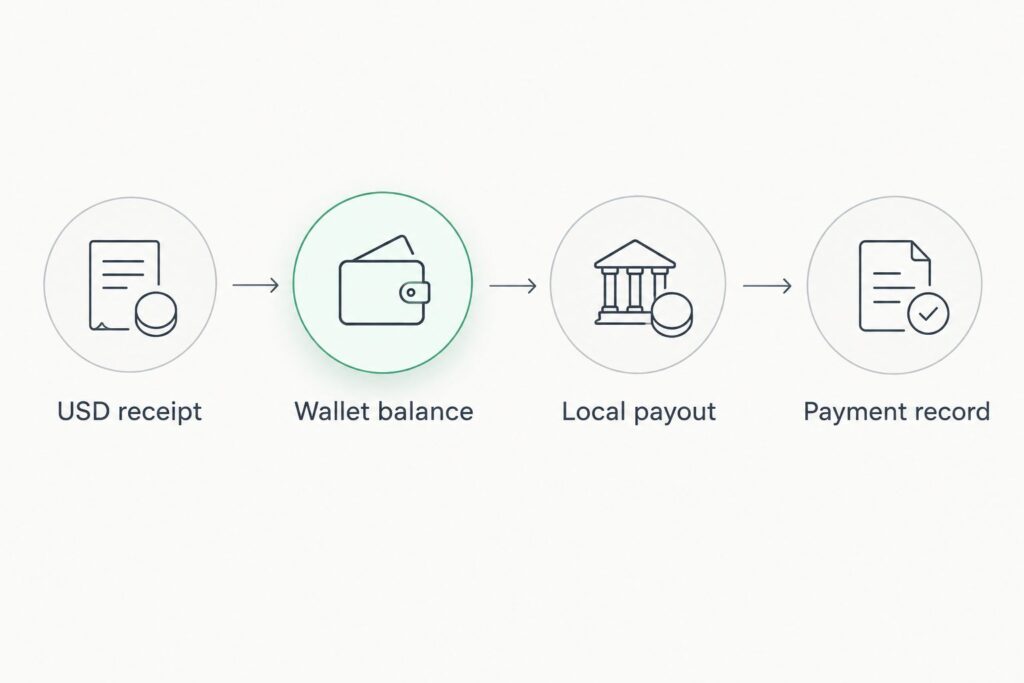
Keep these stages apart in your written process:
- USD receipt: confirm the named payment details and how the client pays.
- Wallet balance: note the stablecoin, the network and who has access.
- Local payout: check the currency, the supplier and the supported route.
- Payment record: link each movement to its invoice and its purpose.
Compare the full cost before you convert
Use a spreadsheet to compare like with like. Fix the starting stablecoin, the destination currency, the supplier and the amount they should receive. If you do not, two quotes can describe different payments and still look comparable.
Keep conversion charges apart from network, transfer and payout charges. A conversion fee alone does not tell you the full cost. Record the exchange rate, the time of the quote and the final amount received next to any deductions. The guide on which costs still apply with free FX is a good checklist for this.
Do not compare a direct stablecoin transfer with a local bank payout as if they were the same thing. What the supplier needs to receive decides the comparison.
- Compare quotes for the same starting and destination currencies.
- Record the rate, the quote time and how long the quote holds.
- Keep conversion, network, transfer and payout charges apart.
- Check the amount the supplier should receive.
- Confirm the currency and route qualify before you approve.
Protect approvals and client money
Start with a written access list. Record who can see balances, start payments, approve them and handle account recovery. Use the controls your services actually offer. Do not assume every dashboard has every approval feature.
Require two separate approvals for any change to a supplier’s bank details. This is an internal control we recommend, not a feature claim about any platform. Confirm the change with a contact you already know at the supplier, through a different channel from the one the request came on.
Agencies also need a plan for when people leave. Contractors and account managers move on while recurring invoices and wallet access stay in place. Remove access on purpose and check open payment instructions. The guide on payment access when an employee leaves lists the steps.
Keep permission to approve campaign work apart from permission to move money. A project owner can confirm delivery without having access to the agency’s wallet.
- Keep an access list with a named business owner.
- Keep changes to supplier details apart from payment approval.
- Confirm changed bank details with a contact you already know.
- Write down recovery duties without sharing recovery secrets.
- Review access whenever an employee or contractor leaves.
Match the invoice, the transfer and the supplier’s receipt
Keep three linked records for each payment: the invoice, the proof of transfer and the accounting entry. Add the payout confirmation when a bank payment is part of the route.
A blockchain confirmation proves the token moved. A bank payout needs proof that the supplier’s bank received it. Do not close a supplier bill just because an earlier conversion or transfer worked.
For retainers and campaign budgets, update what is left of the client’s balance as well as the payment. Your account manager should be able to say what arrived, what was spent and what is still committed.
Keep open items visible. A pending payout, a receipt you cannot match or a refund request needs an owner and a next step.
- Match the invoice reference to the transaction ID.
- Record the stablecoin, network, amount and confirmation.
- Keep conversion and payout records as separate events.
- Update the client’s remaining balance and committed spend.
- Give every open receipt or payout to a named person.
Where Bancoli fits for agencies
Bancoli is a stablecoin on-ramp and off-ramp for businesses. It is not an account that holds many local currencies. Your Smart USD Wallet holds supported stablecoins, and you convert when you pay out.
The Smart USD Wallet can accept and hold USDC, USDi and USDT (USDT on Ethereum only, when your account shows it). The wallet is self-custodial. You control your funds. Bancoli does not own or control them. Banking services are provided through an affiliated chartered bank.
Named USD account details in your business’s legal name are available on every plan, including Free, once your business is verified. Bancoli receives US dollars by ACH, RTP, US domestic wire and stablecoins, and sends by ACH, RTP and local payouts. ACH and RTP payments arrive as supported stablecoins in your Smart USD Wallet, and they convert 1:1. You pick the supported stablecoin. You can also buy USDC with USD by sending it by ACH or RTP from your own business bank account to your named USD details and choosing USDC. Receiving an ACH or RTP payment costs $2 on Free, $1 on Plus, and it is free on Premium.
To pay a contractor or supplier abroad, you choose a supported currency and route for their location and pay from your Smart USD Wallet. They receive local currency in their own bank account. They do not need a Bancoli account for a supported bank payout. You get free FX in 25+ currencies on local payouts, and the pricing page lists the currencies. You can see the steps on Bancoli global payouts.
Every plan also includes invoicing, so you can create, send and track invoices to your clients.
Businesses from 150+ countries are eligible. Access still depends on your business, your location and verification. Check eligibility before you add a payment route to client onboarding.
| Dimension | Bancoli | What to check elsewhere |
|---|---|---|
| Client payments | Named USD details for US dollar payments, plus stablecoins | Which ways your clients can pay you |
| Who controls the funds | You do. The wallet is self-custodial | Ask how funds move for your account |
| ACH and RTP | No Bancoli limit on ACH or RTP | Check the limits that apply to your account |
| Paying contractors abroad | Local payouts, with free FX in 25+ currencies on local payouts | Confirm the currency and delivery method you need |
| Client invoices | Every plan can create, send and track invoices | Check how invoices link to payments |
Compare payment setups for your agency
Pick a setup by the work it has to do. Receiving a stablecoin is different from receiving a bank payment, and neither one pays a contractor in local currency on its own.
| Setup | Good fit for | What it does well | What to check |
|---|---|---|---|
| Bancoli Smart USD Wallet with named USD details | Agencies that get paid in USD or stablecoins and pay contractors in local currency | Receiving, holding and paying out from one wallet | Your eligibility, verification and each payout route |
| Standalone stablecoin wallet | Agencies whose clients and suppliers all use the same stablecoin and network | Direct wallet to wallet payments | Bank receipts, conversion and local payouts need separate services |
| Traditional business bank account | Agencies whose clients and suppliers all use bank payments | Bank collection and supplier payments | Receiving stablecoins needs a separate service |
| Separate wallet and bank providers | Agencies that want to pick each piece on its own | Choice for each task | More handoffs, more matching work and separate access lists |
“Good fit for” describes the job each setup is built around. It is not a ranking. A standalone wallet can be the simpler choice when both sides want a direct token transfer and no bank payment is needed.
Before you switch, run one client invoice through the whole route. Include the matching of records and what happens when something goes wrong. A receipt that works does not test a supplier payout.
Mistakes agencies should avoid
Treating campaign money as agency cash
A wallet balance does not show which money is earned fees and which is still committed to client work. Keep client level budgets and check them before you approve unrelated spending.
Offering a payment route before checking eligibility
A service that works in many countries does not confirm your agency’s eligibility or a specific contractor’s payout route. Check your business requirements and the recipient’s details before you add payment instructions to client onboarding.
Comparing a conversion fee instead of the finished payout
A good conversion quote does not tell you what the contractor receives. Compare the full route, including the destination currency, how they receive it and every deduction.
Letting account managers define paid differently
One person marks an invoice paid when the transfer is sent while finance waits for confirmation. Set one definition for client receipts and another for supplier payouts, and use both every time.
FAQ
How can a marketing agency start accepting stablecoins in 2027?
Start with one client invoice and a written receiving route. Agree on the stablecoin, the network, the invoice currency, the confirmation that closes it and how you will match the records before you share payment details.
Can my agency receive USD payments and hold stablecoins in the same place?
Yes, with Bancoli. Clients can pay your named USD details by ACH or RTP, and those payments arrive as supported stablecoins in your Smart USD Wallet. Confirm your eligibility and verification first.
Can I pay overseas contractors in their local currency?
Yes, where a supported route exists. With Bancoli, you pay from your Smart USD Wallet and your contractor receives local currency in their own bank account. They do not need a Bancoli account for a supported bank payout. You get free FX in 25+ currencies on local payouts.
Is a blockchain transaction enough to mark a supplier invoice paid?
Not when the supplier is paid by bank. A blockchain transaction proves the token moved. Keep the payout confirmation that matches how the supplier agreed to be paid.
Should an agency keep client ad budgets in its main wallet balance?
Keep ad budgets apart in your books, even when the money sits in one wallet. A combined balance does not tell you how much the agency can spend on itself.
What should I compare before choosing a stablecoin payment provider?
Compare eligibility, supported stablecoins and networks, USD receiving details, payout countries, access controls, records and the full payment cost. Choose around the clients you collect from and the suppliers you pay.
One last thing
Decide what failure looks like before you test success. Write down what happens when a client uses an unsupported network, a supplier changes bank details or a payout stays open. Your payment workflow is ready when your team knows who acts next.
If you want to get paid in USD and pay contractors in their own currency from one wallet, start with the Smart USD Wallet and check the fees on pricing.