A wallet that works for one person can fail a team. The questions change once more than one person is involved: who can move money, who approves, how clients pay you in US dollars and what records your accountant gets.
This guide looks at stablecoin wallets through those business questions only. If you want wallets compared feature by feature, including trading and multi-chain apps, see the stablecoin wallet comparison for 2027. This page is about running a wallet as a team.
In short
- Look at Bancoli when your team needs named USD account details, a self-custodial Smart USD Wallet and local payouts to suppliers in one place.
- Look at a multi-signature team wallet when several people must sign each onchain transaction and you handle USD receiving elsewhere.
- Look at a hardware wallet when one person signs and keeping keys offline is the priority.
- A single-person app wallet fits a solo operator, not a team.
The four team questions
Ask every wallet the same four questions.
- Roles: who can see the wallet, and who can move money?
- Approvals: how does a payment get a real yes, and from whom?
- USD account details: can a client pay you in US dollars the way they pay any US supplier?
- Records and exports: can you hand your accountant a record that ties each payment to an invoice?
Stablecoin wallets for business teams at a glance in 2027
| Option | Good fit for | Roles and approvals | USD account details | Records |
|---|---|---|---|---|
| Bancoli | Teams that get paid in USD or stablecoins and pay suppliers in local currency | Wallet access is separate from Bancoli logins, and approvals use MFA or a passkey | Named, in your business’s legal name, on every plan once verified | Check what your export shows for each payment |
| Multi-signature team wallet | Teams that want several signers on each onchain transaction | Set by the signers and the approval threshold you choose | Ask how you would receive USD, and from which provider | Onchain history, plus your own invoice records |
| Hardware wallet | One signer who wants keys kept offline | One person holds the device | Ask how you would receive USD, and from which provider | Onchain history, plus your own invoice records |
| Single-person app wallet | Solo operators | One person holds access | Ask how you would receive USD, and from which provider | Onchain history, plus your own invoice records |
“Good fit for” describes the job each option fits. It is not a ranking.
1. Bancoli: team access, USD details and payouts in one place
Bancoli is a stablecoin on-ramp and off-ramp for businesses. It is not an account that holds many local currencies. Your Smart USD Wallet holds supported stablecoins, and you convert when you pay out.
The Smart USD Wallet can accept and hold USDC, USDi and USDT (USDT on Ethereum only, when your account shows it). The wallet is self-custodial. You control your funds. Bancoli does not own or control them. Banking services are provided through an affiliated chartered bank.
Named USD account details in your business’s legal name are available on every plan, including Free, once your business is verified. Bancoli receives US dollars by ACH, RTP, US domestic wire and stablecoins, and sends by ACH, RTP and local payouts. ACH and RTP payments arrive as supported stablecoins in your Smart USD Wallet, and they convert 1:1. You pick the supported stablecoin. You can also buy USDC with USD by sending it by ACH or RTP from your own business bank account to your named USD details and choosing USDC. Receiving an ACH or RTP payment costs $2 on Free, $1 on Plus, and it is free on Premium.
To pay a supplier, you choose a supported currency and route for their location and pay from your Smart USD Wallet. Your supplier receives local currency in their own bank account. They do not need a Bancoli account for a supported bank payout. You get free FX in 25+ currencies on local payouts, and the pricing page lists the currencies. You can see the steps on Bancoli global payouts.
Every plan also includes invoicing, so you can create, send and track invoices to your clients.
Roles and approvals
Bancoli’s guide on team access to your Smart USD Wallet explains how this works. A Bancoli login alone does not let someone move Smart USD Wallet funds. Moving money needs wallet access, which is a separate set of logins you choose during wallet setup. Approvals use MFA or a passkey on the device. People without wallet access cannot approve a move, even with a Bancoli seat.
Decide who holds wallet access before the first payment, and write it down.
USD account details and payouts
- Clients pay your named USD details by ACH or RTP, or send stablecoins, and you pay suppliers from the same Smart USD Wallet.
- You get free FX in 25+ currencies on local payouts.
- A supported currency does not mean every supplier or payment qualifies. Availability, routes and fees depend on your business, your supplier and the payment route.
- Businesses from 150+ countries are eligible. Access still depends on your business, your location and verification. Check eligibility before you apply.
| Dimension | Bancoli |
|---|---|
| Custody | Self-custodial. You control your funds |
| Who can move money | Only people with wallet access |
| ACH and RTP | No Bancoli limit on ACH or RTP |
| Supplier payouts | Local currency, with free FX in 25+ currencies on local payouts |
Good fit for: teams and solopreneurs already using stablecoins that get paid in US dollars and pay suppliers abroad.
Our take: set up wallet access with the team before you share USD details with clients.
2. Multi-signature team wallet: several signers on each transaction
A multi-signature wallet asks more than one person to sign a transaction before it moves. That gives a team a clear approval step onchain.
What to check
- Ask how clients would pay you in US dollars, and how that money would reach the wallet.
- Plan how you would pay a supplier who wants local currency in their own bank account.
- Decide who holds each signing key and what happens when a signer leaves.
Good fit for: teams that want several signers on each onchain transaction.
Our take: a clear approval step, but plan USD receiving and supplier payouts separately.
3. Hardware wallet: one signer, keys kept offline
A hardware wallet keeps the signing keys on a device one person holds. It fits a single signer who wants keys offline.
What to check
- Ask who signs when that person is away.
- Plan how USD receiving and supplier payouts would work alongside it.
Good fit for: one signer who wants keys kept offline.
Our take: fits one person. Plan cover before a team relies on it.
4. Single-person app wallet: for solo operators
An app wallet on one person’s phone or browser is simple to start. For a team, everything depends on that one person.
What to check
- Ask what happens to payments if that person leaves or loses access.
- Keep the access details out of shared chats and email.
Good fit for: solo operators.
Our take: move to a team setup before a second person needs to pay.
Run one payment through the whole team
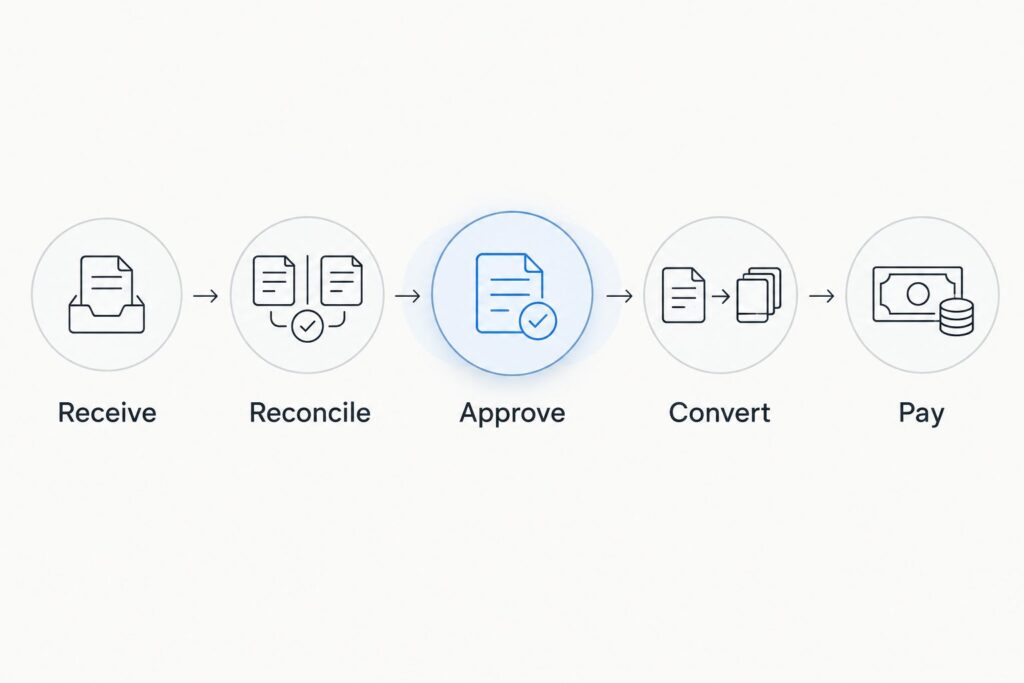
Receive
Confirm how the client pays you: named USD details or a stablecoin transfer on an agreed network.
Reconcile
Match the receipt to its invoice. Use the bank reference or the transaction ID.
Approve
Have the person with approval rights approve the supplier payment. The guide on wallet approval questions lists what finance teams should ask.
Convert
Record the rate and any fee for the supplier’s currency.
Pay
Confirm the exact amount the supplier receives, and keep the payout reference with the invoice.
Records and exports for your accountant
Bancoli’s guide on wallet records for accountants suggests a simple test for any wallet. Open an export and check whether it shows the date, the amount, the currency, the fee, the FX rate, the transaction ID and the network. If something is missing, add a column and fill it in yourself. Keep sign-in and approval details out of the accounting file.
FAQ
What is a good stablecoin wallet for a business team in 2027?
It depends on the job. Bancoli fits teams that need named USD account details, team wallet access and local payouts in one place. A multi-signature wallet fits teams that want several signers on each onchain transaction and handle USD receiving elsewhere.
Can everyone with a Bancoli login move money?
No. Bancoli’s team access guide says a Bancoli login alone does not let someone move Smart USD Wallet funds. Only people with wallet access can approve a move.
Can clients pay my business in US dollars with Bancoli?
Yes, when they can pay from a US bank account or send stablecoins. Named USD account details in your business’s legal name are available on every plan, including Free, once your business is verified. Clients can pay them by ACH, RTP or US domestic wire from a US bank account, or send supported stablecoins.
What should I do when someone with wallet access leaves?
Plan it before it happens. The guide on payment access when an employee leaves walks through the steps.
Who controls the funds in a Bancoli wallet?
You do. The wallet is self-custodial. Bancoli does not own or control your funds.
One last thing
Write down three names before you pick a wallet: who can move money, who approves and who takes over if one of them leaves. Choose the wallet that fits that list.
If you want to get paid in USD and pay suppliers in their own currency from one wallet, start with the Smart USD Wallet and check the fees on pricing.