Xe says its business account lets you manage and send money worldwide from one business account, and that businesses can use forward contracts, limit orders and options to manage currency risk. That is a strong fit when currency conversion and rate planning are the main job.
Bancoli starts from a different place. It is built for businesses that get paid on named USD details or in stablecoins, hold supported stablecoins in a self-custodial Smart USD Wallet and convert only when they pay a supplier in local currency. This guide compares the two on the questions a business has to answer about FX.
In short
- Look at Xe Business when you need to plan conversions ahead with forward contracts or limit orders, or talk to a currency specialist.
- Look at Bancoli when you get paid in USD or stablecoins and pay suppliers in local currency, with free FX in 25+ currencies on local payouts.
- Compare both on the amount your supplier receives, not on a quoted rate alone.
- Count the conversions. Each extra one can cost you.
How each one handles a conversion
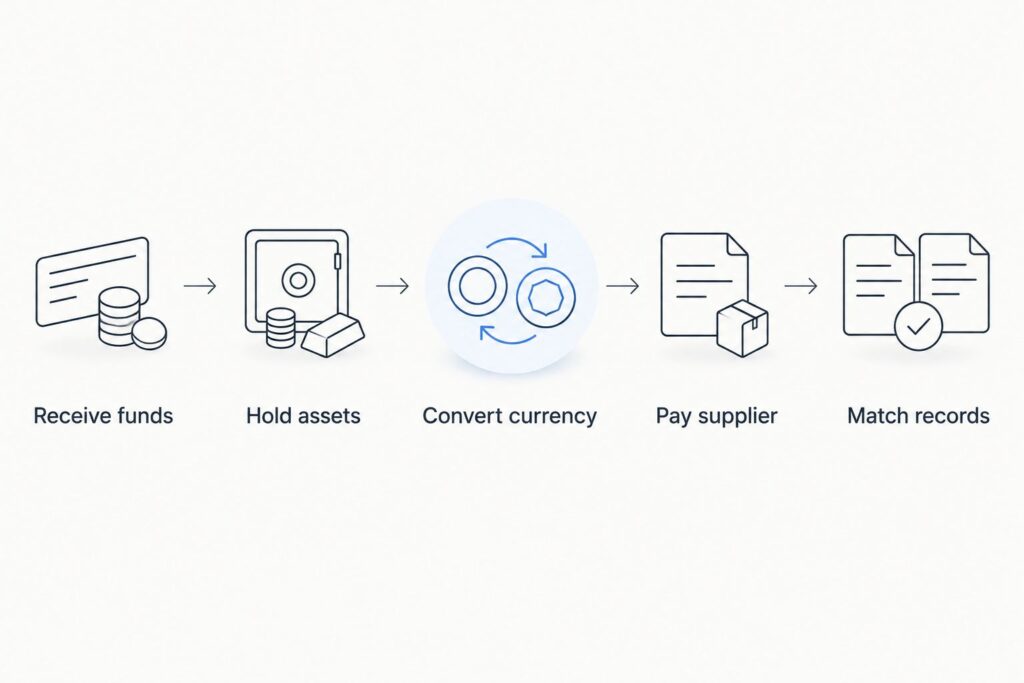
An FX payment has five stages. You receive funds, you hold them, you convert, you pay the supplier and you match the records. Where the conversion sits in that chain decides what it costs you.
With Xe Business, you hold and send money from your Xe business account and convert as part of the transfer, with tools to fix a rate ahead if you need one.
With Bancoli, client payments arrive as supported stablecoins in your Smart USD Wallet, and they convert 1:1 from ACH and RTP. You hold them until you pay. The conversion to the supplier’s currency happens on the local payout.
Bancoli vs Xe Business at a glance in 2027
| Question | Bancoli | Xe Business |
|---|---|---|
| Starting point | Receive, hold and pay from a Smart USD Wallet | Manage and send money from one business account |
| What you hold | Supported stablecoins, in a self-custodial wallet | Check the balances your Xe account supports |
| Getting paid by clients | Named USD details by ACH, RTP and US domestic wire, plus stablecoins | Compare how clients would pay into your Xe account |
| ACH and RTP | No Bancoli limit on ACH or RTP | Check the terms that apply to your account |
| FX on payouts | You get free FX in 25+ currencies on local payouts | Compare the rate and fees shown for each transfer |
| Planning a rate ahead | Ask before you assume it is offered | Forward contracts, limit orders and options |
This table compares how each service is built. It is not an overall ranking.
Where Xe Business fits
Xe puts currency risk tools at the center of its business offer. Its business page lists forward contracts, limit orders and options, and the option to work with a currency specialist.
What to check
- Confirm your business is eligible and that the currencies and countries you pay are covered for your account.
- Ask for the rate and every fee on a real transfer amount, not a sample.
- Xe’s site notes that the mid-market rates it publishes are not transactional rates. Compare the rate you are actually offered.
These are checks for your own route, not claims that a feature is missing. Confirm the current terms on Xe’s own site before you decide.
Good fit for: businesses that need to plan conversions ahead and manage currency risk.
Our take: worth a call with their team if forward contracts or limit orders are part of your plan.
Where Bancoli fits
Bancoli is a stablecoin on-ramp and off-ramp for businesses. It is not an account that holds many local currencies. Your Smart USD Wallet holds supported stablecoins, and you convert when you pay out.
The Smart USD Wallet can accept and hold USDC, USDi and USDT (USDT on Ethereum only, when your account shows it). The wallet is self-custodial. You control your funds. Bancoli does not own or control them. Banking services are provided through an affiliated chartered bank.
Named USD account details in your business’s legal name are available on every plan, including Free, once your business is verified. Bancoli receives US dollars by ACH, RTP, US domestic wire and stablecoins, and sends by ACH, RTP and local payouts. ACH and RTP payments arrive as supported stablecoins in your Smart USD Wallet, and they convert 1:1. You pick the supported stablecoin. You can also buy USDC with USD by sending it by ACH or RTP from your own business bank account to your named USD details and choosing USDC. Receiving an ACH or RTP payment costs $2 on Free, $1 on Plus, and it is free on Premium.
To pay a supplier, you choose a supported currency and route for their location and pay from your Smart USD Wallet. Your supplier receives local currency in their own bank account. They do not need a Bancoli account for a supported bank payout. You get free FX in 25+ currencies on local payouts, and the pricing page lists the currencies. You can see the steps on Bancoli global payouts.
Every plan also includes invoicing, so you can create, send and track invoices to your clients.
What to check
- A supported currency does not mean every supplier or payment qualifies. Availability, routes and fees depend on your business, your supplier and the payment route.
- Businesses from 150+ countries are eligible. Access still depends on your business, your location and verification. Check eligibility before you apply.
- If you need to lock a rate weeks ahead, ask about that directly. This comparison is about the payout itself.
- Decide who on your team can approve payments from the wallet, and write it down.
Good fit for: businesses and solopreneurs already using stablecoins that pay suppliers in local currency.
Our take: worth a trial for paying suppliers once your eligibility is confirmed.
Cost: compare the amount the supplier receives
A quoted rate is only part of the cost. Fees, the margin built into the rate and any extra conversion along the route all change what arrives.
For each option, quote the same amount at the same time and write down the amount you send, the rate, each fee and the exact amount the supplier gets. That is the only number that settles the comparison.
The guide to business FX fees explains each part of the cost, and the post on free FX and the costs that still apply shows what free FX does and does not cover.
Count the conversions
Every time money changes currency, someone sets a rate. Two conversions on one payment mean two chances to lose value.
One pattern to watch is converting stablecoins to US dollars, then US dollars to the supplier’s currency. If you can pay the supplier straight from what you hold, you can skip a step. The guide on the hidden second FX conversion shows where the extra conversion hides.
Check before the first real payment
Agree the invoice currency
Agree with the supplier which currency the invoice is in and who carries any rate change. The guide on invoice amounts and exchange rates covers the wording.
Confirm the supplier’s details
Confirm the supplier’s legal name, bank details and currency in writing before you pay.
Keep the rate in your records
Save the rate, the fees and the amount received with the invoice, so your accountant can explain any difference.
FAQ
Is Bancoli an alternative to Xe Business in 2027?
For businesses paid in USD or stablecoins that pay suppliers in local currency, yes. Bancoli pays from your self-custodial Smart USD Wallet, and you get free FX in 25+ currencies on local payouts. If forward contracts are central to your plan, compare that need separately.
What does free FX mean with Bancoli?
You get free FX in 25+ currencies on local payouts. The pricing page lists the currencies and the fees on each plan.
Does Xe Business offer forward contracts?
Xe’s business page lists forward contracts, limit orders and options as tools to manage currency risk. Check the terms for your business on its site.
How do I compare FX costs between two providers?
Quote the same amount at the same time and compare the exact amount the supplier receives after the rate and every fee.
Does my supplier need a Bancoli account?
No, not for a supported bank payout. Your supplier receives local currency in their own bank account.
One last thing
Write down where every conversion happens on your payment, and who approves it. Once you can see the chain, choosing between providers gets much easier.
If you want to get paid in USD and pay suppliers in their own currency from one wallet, start with the Smart USD Wallet and check the fees on pricing.