Bill.com is built around bills. Its own site describes accounts payable, accounts receivable, and spend and expense tools that let you create and pay bills. That is a strong fit when invoice approvals are the main job.
It is not the whole answer when your business also receives stablecoins, wants to control those funds itself and needs to pay suppliers in their local currency. This guide compares Bancoli, Wise Business, Airwallex and a traditional business bank against that wider job.
In short
- Keep Bill.com when accounts payable automation is still your main need.
- Look at Bancoli when you get paid on named USD details or in stablecoins and want to pay suppliers in local currency from a self-custodial Smart USD Wallet.
- Look at Wise Business and Airwallex when international bank transfers or a wider finance platform are the main need, and check them against your own countries and controls.
- Compare receiving, control of funds, supplier payouts and records one by one before you replace anything.
Why this matters
An accounts payable tool and a payment platform overlap, but they do different jobs. Approving a supplier invoice is one job. Receiving money, holding stablecoins and sending local currency to a supplier’s bank account is another.
Start with the part of your process that needs fixing. A new approval tool will not change how you handle stablecoins. A new wallet will not copy your invoice approvals.
If your business already uses stablecoins, ask four plain questions. Can you receive the money? Do you control it? Can you pay the supplier in the currency they use? Can your accountant match it all to the invoice?
Bill.com alternatives at a glance in 2027
| Option | Good fit for | What to look at | Difference from Bill.com |
|---|---|---|---|
| Bill.com | Businesses where accounts payable automation drives the decision | Bill approval and payment workflows | The benchmark for invoice handling and approvals |
| Bancoli | Businesses already using stablecoins | Named USD account details, a self-custodial Smart USD Wallet and free FX in 25+ currencies on local payouts | Adds a stablecoin-first way to receive, hold and pay |
| Wise Business | Businesses focused on international bank transfers | Paying and getting paid in other currencies | Compare it on cross-border money movement, not on approval features |
| Airwallex | Businesses looking at a wider finance platform | Business accounts, transfers, payments and billing | Compare its payment setup against your approval and accounting needs |
| Traditional business bank | Businesses that want a bank-led relationship | The specific bank’s account terms and services | A bank relationship is a different choice from an accounts payable tool |
“Good fit for” describes the job each option is built around. It is not an overall ranking. Your business location, your suppliers’ countries and the controls you need decide which options stay on your list.
1. Bancoli: for businesses already paid in stablecoins
Bancoli is a stablecoin on-ramp and off-ramp for businesses. It is not an account that holds many local currencies. Your Smart USD Wallet holds supported stablecoins, and you convert when you pay out.
The Smart USD Wallet can accept and hold USDC, USDi and USDT (USDT on Ethereum only, when your account shows it). The wallet is self-custodial. You control your funds. Bancoli does not own or control them. Banking services are provided through an affiliated chartered bank.
Named USD account details in your business’s legal name are available on every plan, including Free, once your business is verified. Bancoli receives US dollars by ACH, RTP, US domestic wire and stablecoins, and sends by ACH, RTP and local payouts. ACH and RTP payments arrive as supported stablecoins in your Smart USD Wallet, and they convert 1:1. You pick the supported stablecoin. You can also buy USDC with USD by sending it by ACH or RTP from your own business bank account to your named USD details and choosing USDC. Receiving an ACH or RTP payment costs $2 on Free, $1 on Plus, and it is free on Premium.
To pay a supplier, you choose a supported currency and route for their location and pay from your Smart USD Wallet. Your supplier receives local currency in their own bank account. They do not need a Bancoli account for a supported bank payout. You get free FX in 25+ currencies on local payouts, and the pricing page lists the currencies. You can see the steps on Bancoli global payouts.
Every plan also includes invoicing, so you can create, send and track invoices to your clients.
Where Bancoli fits
- Clients pay your named USD details by ACH or RTP, or send stablecoins, and you pay suppliers from the same Smart USD Wallet.
- Suppliers abroad keep the bank account they already use, and you get free FX in 25+ currencies on local payouts.
- Every plan can create, send and track invoices to your clients.
- The wallet is self-custodial. You control your funds.
Where to check before you switch
- Bancoli’s plan list describes invoicing as creating, sending and tracking invoices. If your team relies on Bill.com to approve the bills you owe, confirm how that step will work before you move it.
- A supported currency does not mean every supplier or payment qualifies. Availability, routes and fees depend on your business, your supplier and the payment route.
- Businesses from 150+ countries are eligible. Access still depends on your business, your location and verification. Check eligibility before you apply.
- Decide who on your team can approve payments from the wallet, and write it down.
| Dimension | Bancoli | Bill.com benchmark |
|---|---|---|
| Starting point | Receive, hold and pay from a Smart USD Wallet | Manage supplier bills and the payments tied to them |
| Who controls the funds | You do. The wallet is self-custodial | Ask how funds move for your account |
| ACH and RTP | No Bancoli limit on ACH or RTP | Check the limits that apply to your account |
| Paying suppliers abroad | Local payouts, with free FX in 25+ currencies on local payouts | Confirm the currency and delivery method you need |
| Test before you switch | Run a real supplier payment and the accounting handoff | Show the approval workflow you need to keep |
Good fit for: businesses and freelancers already using stablecoins that need named USD details and local payouts to suppliers.
Our take: worth a trial for the payment side once your eligibility is confirmed. Do not assume it replaces every accounts payable function.
2. Wise Business: for international bank transfers
Wise describes Wise Business as an international business account for doing business in other currencies, where you can pay invoices, get paid and manage expenses. It belongs on your list when international transfers and currency conversion are the main problem.
Start with the payment you need to send. Compare the business eligibility, the way you would receive money and the route to your supplier. Do not assume it matches Bill.com’s approval features or a stablecoin wallet.
Where Wise Business fits
- Its focus on international transfers and currency conversion matches a review led by bank transfers.
- It is a useful benchmark when your suppliers want a bank transfer rather than stablecoins.
Where to check before you switch
- Choosing a transfer service does not answer how your business will handle the stablecoins it already holds.
- You still need to confirm approvals, accounting and how you receive money.
These are limits of the comparison, not claims that a feature is missing. Ask for current product documentation or a demo before you decide.
| Dimension | Wise Business | Bill.com benchmark |
|---|---|---|
| Main question | Does it cover your international bank transfer route? | Does it cover your supplier bill workflow? |
| Cost check | Compare the rate and delivery terms you can actually get | Compare the full payment route you use today |
| Test before you switch | Check the accounting handoff and the approvals you need | Keep the controls that already work for your team |
Good fit for: businesses whose first need is international bank transfers and currency conversion.
Our take: worth a trial once your route and controls pass your comparison. Wait if stablecoin handling is still the open question.
3. Airwallex: for a wider finance platform
Airwallex describes itself as a financial platform that brings together business accounts, transfers, cards, expenses, payments and billing. It is a candidate when cross-border payments sit at the center of how you operate.
Check it against the countries, currencies and workflows your business really uses. A broad platform still has to meet your own receiving, approval and record keeping needs.
Where Airwallex fits
- Its cross-border payments focus makes it relevant for a business with international operations.
- It gives you one more platform to compare on receiving, conversion and supplier payments together.
Where to check before you switch
- A broad product list does not confirm support for your business or your supplier’s country.
- International payments alone do not tell you whether it offers a self-custodial stablecoin wallet or matches your accounts payable setup.
| Dimension | Airwallex | Bill.com benchmark |
|---|---|---|
| Starting point | International business payments | Supplier bills and payments |
| Eligibility test | Confirm your business and the countries you need | Confirm the payment routes your current workflow supports |
| Control test | See permissions and the accounting handoff in a demo | Keep the invoice approvals and records you need |
Good fit for: businesses comparing cross-border payment platforms across their companies and suppliers.
Our take: wait until your business, countries and controls are confirmed in a demo.
4. Traditional business bank: for a bank-led relationship
A traditional business bank belongs in the comparison when the banking relationship itself is what you need. Look at the specific bank’s account terms and services. Banks are not all the same product.
Where a bank fits
- It answers the question of opening or keeping a business banking relationship directly.
- It lets you judge bank services separately from wallets and accounts payable software.
Where to check before you switch
- A bank account alone does not give you a way to receive or manage stablecoins.
- Bank services do not replace invoice capture, approvals or accounting software on their own.
Good fit for: businesses that need a bank relationship alongside, or instead of, a separate payment platform.
Our take: keep your current bank relationship until the new workflow is proven. If you need to handle stablecoins, check that a bank-only setup covers it.
Why businesses look beyond Bill.com
The good reasons to look are about function. A need outside accounts payable can justify adding or changing payment tools. It does not mean Bill.com does its own job badly.
- Stablecoin receipts become routine, and you need a clear way to receive, control and record them.
- Suppliers want local currency, so what you receive and what they get are two different choices.
- You need to know who controls the funds, not only who can log in to a dashboard.
- Currency conversion becomes its own decision, and your finance team wants to compare what leaves your business with what reaches the supplier.
Do not replace an approval system that works just to get another way to pay. A separate payment workflow can be the right answer when it fills the gap without breaking your invoice controls.
Check the full payment workflow before you switch
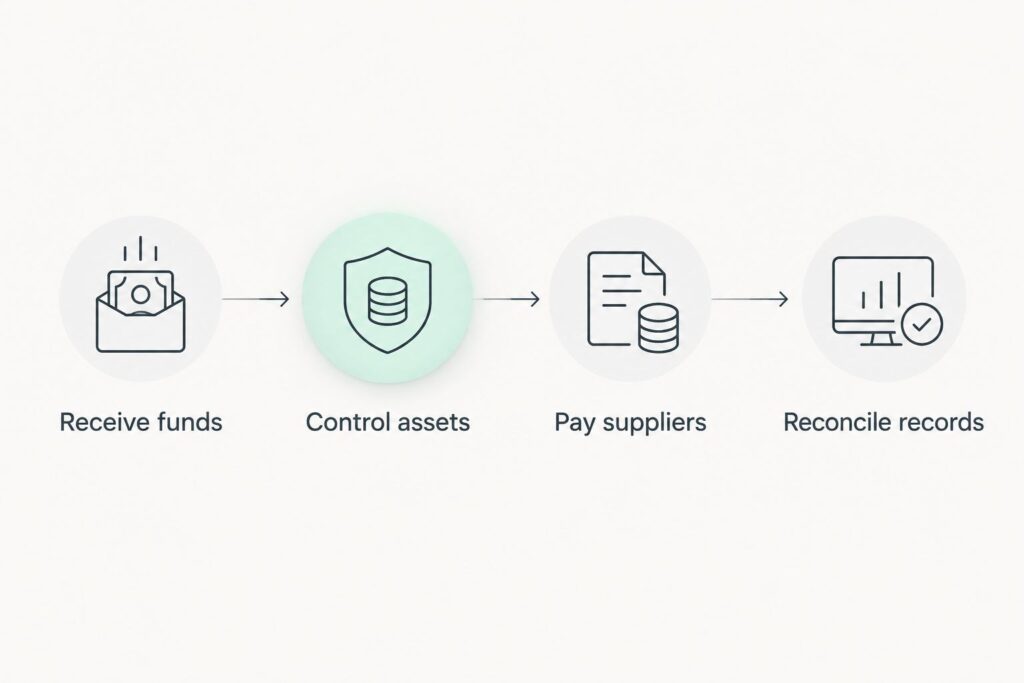
Walk one real supplier invoice from the money coming in to the accounting entry. Use four checks.
Receive funds
Confirm your named USD account details, what your payers need and any verification steps. Note which payments arrive by bank transfer and which arrive as stablecoins.
Control funds
Decide who can approve a payment from the wallet and what happens when that person leaves. Write the process down. Keep sign-in details out of ordinary accounting records.
Pay suppliers
Confirm the supplier’s currency, the route, their details and the conversion before you approve the payment. A supported currency is not a promise that every supplier or payment qualifies.
Match the records
Keep three records together: the invoice, the outgoing payment and the supplier’s confirmation that the money arrived. Note any conversion separately, so your accountant can tell the supplier bill apart from the movement of money.
A finished wallet transfer is not proof that a local bank payout reached the supplier. Decide which event closes the invoice, and keep the evidence for it.
When staying with Bill.com is the right call
Stay with Bill.com when handling and approving supplier bills is still the main job and your current setup does it well. A new type of money or payout route does not by itself justify moving your whole accounts payable process.
Keep your current platform until you have confirmed the new option’s permissions, accounting handoff and supplier payments. Adding stablecoin payments is a separate decision from replacing accounts payable automation. You can do the first without the second.
FAQ
What is a good Bill.com alternative for stablecoin payments in 2027?
Bancoli fits businesses that already use stablecoins and need named USD account details and local payouts to suppliers, from a self-custodial Smart USD Wallet. Confirm your eligibility, verification and supplier countries before you choose it.
Is a stablecoin payment platform a full Bill.com replacement?
Not automatically. A platform that receives and sends money still has to meet your invoice approvals, permissions and accounting needs before it can replace your accounts payable system.
Should I compare Wise Business with Bill.com?
Yes, when international bank transfers and currency conversion are the need. Compare that need separately from the supplier bill workflow you use today.
Can I receive stablecoins and pay a supplier in local currency?
Yes, where a supported route exists. With Bancoli, you pay from your Smart USD Wallet and your supplier receives local currency in their own bank account. They do not need a Bancoli account for a supported bank payout. You get free FX in 25+ currencies on local payouts.
What should I compare besides conversion fees?
Compare the whole payment route and the amount the supplier actually receives. Include transfer, intermediary and receiving bank charges, and keep the conversion separate from the final bank delivery.
When should I keep Bill.com instead of switching?
Keep Bill.com when accounts payable automation is still your main need and your current workflow meets it. Add another way to pay separately if that closes the gap without disrupting approvals and accounting.
One last thing
Choose where the money must end up before you choose the rail. A supplier invoice paid from stablecoins can still end as local currency in the supplier’s bank account. Those are separate stages with separate evidence.
Before you move recurring suppliers, map who controls the funds, which route carries the bank payment and which confirmation proves the supplier was paid.
If you want to get paid in USD and pay suppliers in their own currency from one wallet, start with the Smart USD Wallet and check the fees on pricing.